How I found CloudyIT:
I first found out about CloudyIT from my computer science teacher, and I’m glad I did because I’ve learned many useful skills that are sure to help me in the future.
I first joined when I was in Year 9, where I took part in one of the Cloudy Foundation’s projects. It was really fun and introduced me to the concept of low-code.
Working With CloudyIT on My Silver DofE Award:
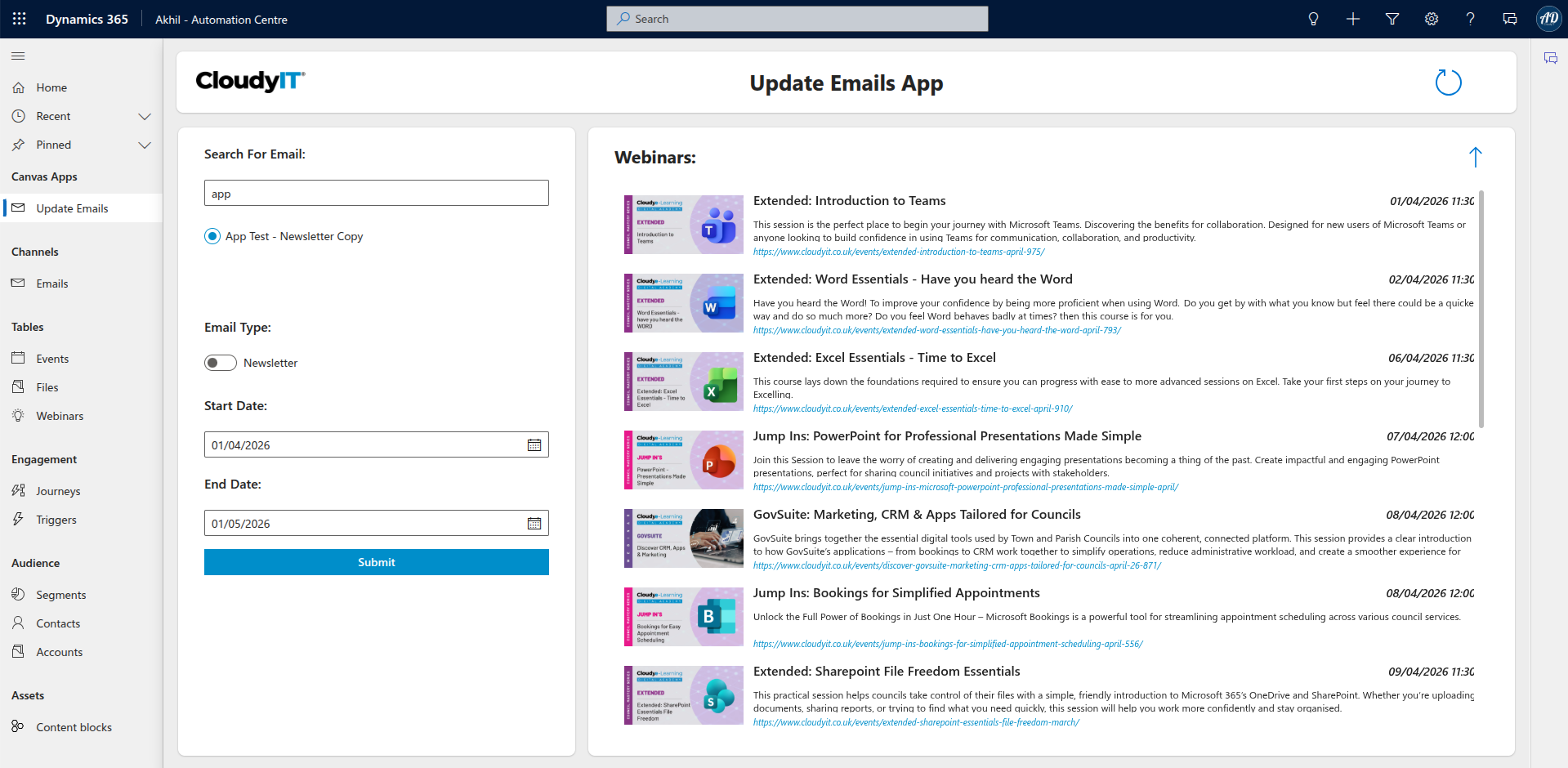
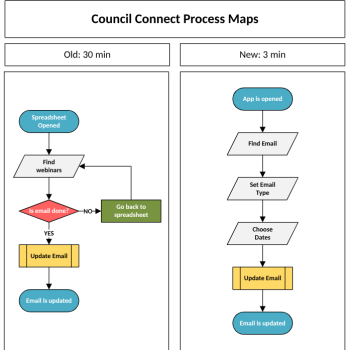
Over my 6 months of DofE volunteering, I used many services such as Power Apps and Power Automate, many of which I had never seen before. Thanks to the help of CloudyIT, I learned the skills needed to build apps and automations that reduced the time needed to create Council Connect emails from 30 minutes to just 3!
At the time of writing, I’m a Year 11 student preparing for my GCSEs. I’ve just finished a week back at Cloudy, where I worked on the next generation of emails. If you get an email about CloudyIT’s webinars, remember—that was me 😊.
It really was a great experience, and I would recommend it to anyone with an interest in IT. I look forward to working with CloudyIT again over my long, well-deserved summer break!
Project 1 – CALC and Newsletter Emails
At this point, I was already using Dynamics 365 to manage webinars (which was much better than using an Excel spreadsheet). My previous MA PowerApps displayed the information far more clearly, and I had already built a basic automation that could generate HTML and insert it into emails.
This time, Cloudy launched two new types of emails – CALC training emails and newsletters, which list upcoming webinars.
I began work straight away, revisiting my previous MS PowerApps and automations before creating a completely new APP that saved even more time. The best part was that it wasn’t just for me – Darcey and Kerrin from marketing would be using my app too, which made me feel really proud of my work. I even had the chance to train others on how to use it.
What I also appreciated was the support from the team. We had daily meetings throughout the week to review my progress, which made it clear that what I was doing was important and valued.
Project 2 – Order Automation
A good order isn’t just about the product – it’s about what happens after. Before, the Sales Department had to manually send follow-up emails to customers. The problem is, Cloudy gets a lot of orders. That’s great, but it also means a lot of emails.
As part of my next project, I was tasked with creating a customer journey in Dynamics 365 that would automatically send friendly follow-up emails after a purchase.
Although I wasn’t able to finish the full journey, I did manage to get one email working. I put a lot of thought into the design and overall look of it. Now, the developers at Cloudy have a strong starting point to build the rest.
That was another thing I really enjoyed about my time at Cloudy – the solutions I created were actually being used by real people.