Jacob working at CloudyIT

Jacob’s Journey from the Enterprise Academy to Work Experience

I am Jacob and I spent the last week doing work experience at CloudyIT.

I found CloudyIT through the Cloudy Foundation Enterprise Academy, an online programme to educate students on the Microsoft Power Platform, which I have been attending for the past year.

The Enterprise Academy was an opportunity I found through school; where students attend virtual meetings to learn about Microsoft Power Apps and the Microsoft Power Platform in general.

I chose to do work experience at CloudyIT because our school decided against work experience this year and I wanted to do something to set me apart from my peers.

In that regard it has helped me greatly and will not only help me greatly with any job that requires knowledge surrounding the Microsoft Power Platform, but my week here has helped me understand that.

Jacob on PC

Work on the Cemetery App for Councils

As part of my work experience at CloudyIT, I helped to develop the Cemetery Management App, designed to help councils document grants, internments, and allotments for multiple cemeteries. This work ties into my experience at the Enterprise Academy, where we looked into the creation of the app.

My task was to look at what records could be viewed publicly and then add that functionality to the web page. After spending far too much time looking at government legislation, I found that all records were “available for inspection by the public at all reasonable times.”

When it came to this part of my work at Cloudy, integrating this into the app itself proved to be the hardest part; trying multiple approaches to the issue highlighted the importance of this experience in the workplace.

Using Power Pages

I worked on Power Pages, some of Microsoft’s new web page hosting/creation software and looked at how it could be used to help with other ongoing projects (such as the Cemetery Management App) or planned future projects such as Leighton Linslade’s community app project.

Leighton Linslade Council is looking into the creation of a programme to loan out devices to vulnerable adults who otherwise would not have any sort of access to this sort of help. To enhance the programme, we investigated how Power Pages could be used to make it a web page with an integrated portal. I was also tasked with creating some of the setup items for the projects, such as Power Platform tables and the Unified Modelling Language (UML) that helps us apply a standard way to visualise the design of a software system.

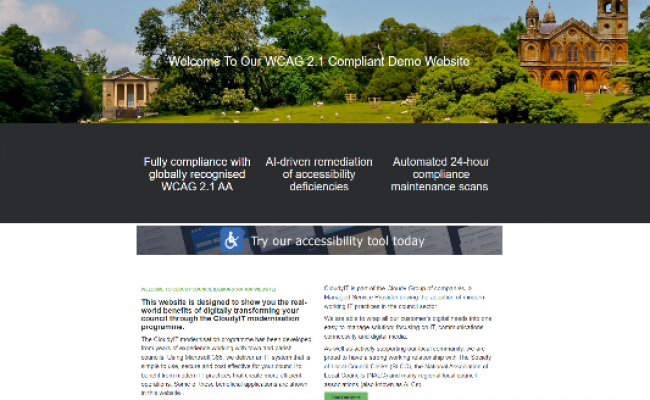
All this ties into the final thing I did which was create a parallel of the pre-existing Cloudy designed Council website in Power Pages to highlight the functionality of this platform. Below is the original vs what was created.

Scroll to view
SLIDE 1: Screen grab of the responsive Cloudy Council accessible demo website, vs SLIDE 2: Jacob’s replica using Power Pages showing a low-code, “drag and drop” website design that is responsive and can employ business data forms stored in the Microsoft Dataverse.

Conclusion

I really enjoyed the week (and a bit) I spent at CloudyIT. There was lots to do and everyone there was both helpful and encouraging.

When it comes to other students looking for work experience at Cloudy, I would highly recommend it as it offers both practical experience and opportunities for a future in the IT industry.

The Enterprise Academy was a big help when it came to finding these new opportunities and learning some of the things that are incredibly useful in the IT industry.

Add a Comment

Your email address will not be published. Required fields are marked *